iTop-br-powersocket
Copyright (c) 2021-2026 Björn Rudner

Status
[!WARNING] This project is no longer maintained as a standalone extension.
The functionality of
iTop-br-powersockethas been integrated intoiTop-br-power-infrastructurestarting with version1.0.0.Please use
iTop-br-power-infrastructurefor all new installations and future updates.
Migration
If you are currently using iTop-br-powersocket, please plan to migrate to:
The integrated module now provides the former PowerSocket functionality together with additional power infrastructure capabilities such as:
- generic power infrastructure extensions
- UPS support
- UPS battery support
- PDU-related power socket handling
- consolidated power infrastructure modeling in a single extension
Upgrade to iTop-br-power-infrastructure
The functionality of iTop-br-powersocket has been integrated into iTop-br-power-infrastructure starting with version 1.0.0.
Upgrade path
- Install version
1.0.0ofiTop-br-power-infrastructure. -
Remove the old extension directory from your
extensionsfolder:extensions/iTop-br-powersocket -
Make sure the new extension directory is present:
extensions/iTop-br-power-infrastructure - Run the iTop setup or upgrade process.
Important notes
- Existing data from
iTop-br-powersocketwill remain available after the migration. - Do not upgrade directly to a version newer than
1.0.0when migrating fromiTop-br-powersocket. - Always install
iTop-br-power-infrastructureversion1.0.0first, then continue with later updates.
Download
Version 1.0.0 is available here:
Former Scope of This Project
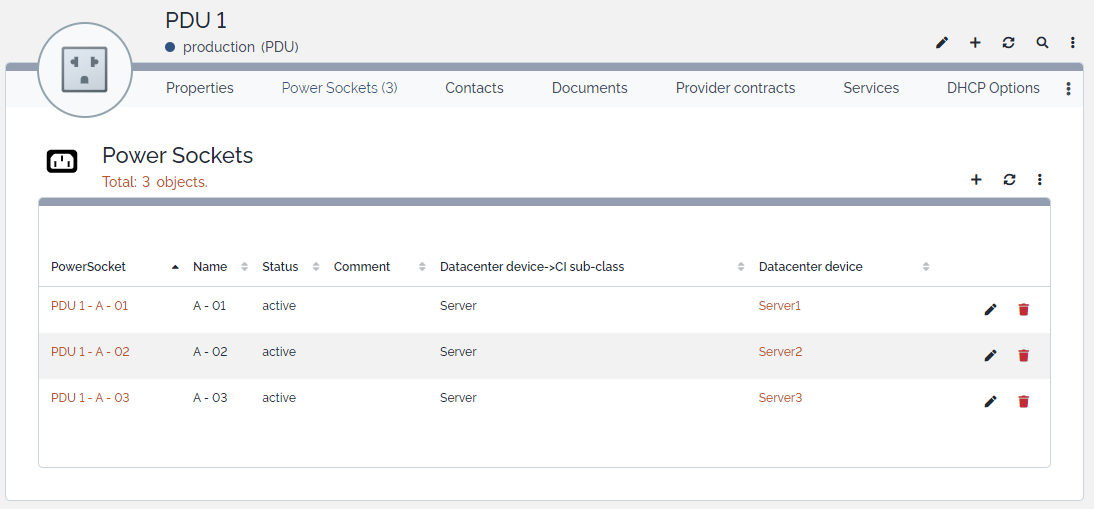
This extension added the concept of individual power sockets to PDUs in iTop and allowed DatacenterDevice objects to be connected to specific PDU sockets.
It introduced the class PowerSocket and provided automatic synchronization logic between:
PowerSocketPDUDatacenterDevice
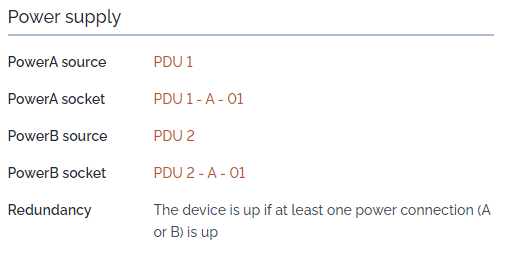
Each DatacenterDevice could be connected to:
- one Power A socket
- one Power B socket
The extension ensured that:
- no more than two sockets were assigned to a single
DatacenterDevice - slots were automatically assigned (A first, then B)
- connections stayed consistent when objects were updated or deleted
- invalid assignments were rejected or rolled back
Features
The original standalone extension provided:
- a dedicated
PowerSocketclass - a socket list on
PDU - automatic batch creation of power sockets for PDUs
- Power A / Power B socket fields on
DatacenterDevice - automatic slot assignment (A → B)
- consistency checks and rollback logic
- event-driven synchronization logic
- PHP 8.2+ compatibility
- multilingual support based on dictionaries
Screenshots
Power Supply
PDU
Historical Notes
This repository is kept for historical reference and existing users of the standalone module.
No further feature development is planned here.
Future development will continue in:
iTop Compatibility
Historical compatibility of this standalone extension:
The standalone extension was tested on:
- iTop
2.7.10 - iTop
3.2.1
Attribution
This extension uses icons from:
 by Arthur Shlain from https://thenounproject.com/browse/icons/term/power-connector/